← Back to Method Diagram
“A good service is one that works in the real world, not just on paper or in a design prototype. That means understanding the systems, processes and people that support it – not just the front-end interface.” – Lou Downe (Author of Good Services, former UK Government Head of Design)
Purpose of Service Design
When solving any problem more significant than a marketing campaign, one truth becomes clear: no meaningful or valuable solution can be delivered without Service Design. In the real world, any significant solution is never just digital and it’s essential that we consider/deliver not only the user interface/experience, but the support systems and resources required to operate them at scale.
Service Design allows us to explore current state, and design future state, services that work seamlessly, end-to-end, across interfaces, people, processes, systems, and channels – not just at the surface. Its purpose is to align the touch points users experience – physically as well as digitally (often simultaneously) – with what the organisation is capable of delivering, sustainably and at scale. By intentionally designing both the visible and invisible layers of a service, it reduces friction, avoids failure points, and unlocks opportunities for lasting value.
Ignored or forgotten, this leads to a service that looks right but doesn’t work right. What’s worse, the organisation may not even understand why it’s failing – because the interface appears fine.
A challenge can be approached through a UX lens alone – many do – but it will be designing just the user interface. It will miss the behavioural, operational, resources, technology, business and systemic layers where real value is empowered (or not), experienced, and sustained.
“We must design for the entire system: the complete experience. If we focus only on the surface – the screen or the product – we miss the real issues, and we often end up designing failure.”
– Don Norman (one of the godfathers of UX)
Value of Service Design
Service Design isn’t optional. It’s the difference between something that looks like it works and something that works across the business and in the real world. It has huge value at tactical and strategic levels, for the delivery team, stakeholders and the organisation overall. Below are just some:
- Shows layout, interaction and behaviour of solution – per use case or over all
- Communicates the behaviours, systems, resources and restrictions required or in place to deliver on specific utility to stakeholders, developers, business and systems teams: so decisions can be made, not just at project levels, but at organisation levels.
- Ensures resources and investment are focused on end-to-end value
- Increases confidence in delivering outcomes that actually work in the real world and within the abilities of the organisation.
- Provides a system-wide view, aligning customer experience with operational reality
- Working in hand with the EPaRM, Thematic Insights, and the related Use Case, it surfaces risks early (e.g. unsupported policies, disconnected systems, disparate data) in a similar way to the related User Journey, except we are focussed on the happy path overview less than all the conditionals and edge cases of a User Journey.
- Improves alignment between strategy and execution
- Clarifies who needs to do what across touch-points, teams, and systems
- Reduces handover friction between frontstage and backstage teams
- In tandem with other tasks, it exposes hidden dependencies and blockers before build/delivery and helps ensure we build solutions that are deliverable, not just desirable.
- Creates a shared, visual reference that improves cross-functional coordination
From an Organisation perspective:
- Ensures services are scalable, adaptable, and sustainable
- Builds a reusable understanding of how services actually work within the organisation
- Aligns technology, policy, operations, and design into a single cohesive system
- Improves service quality, efficiency, resilience and costs
- Supports ongoing, centralised transformation without constant rework or reinvention
Anatomy of a Service Design Blueprint
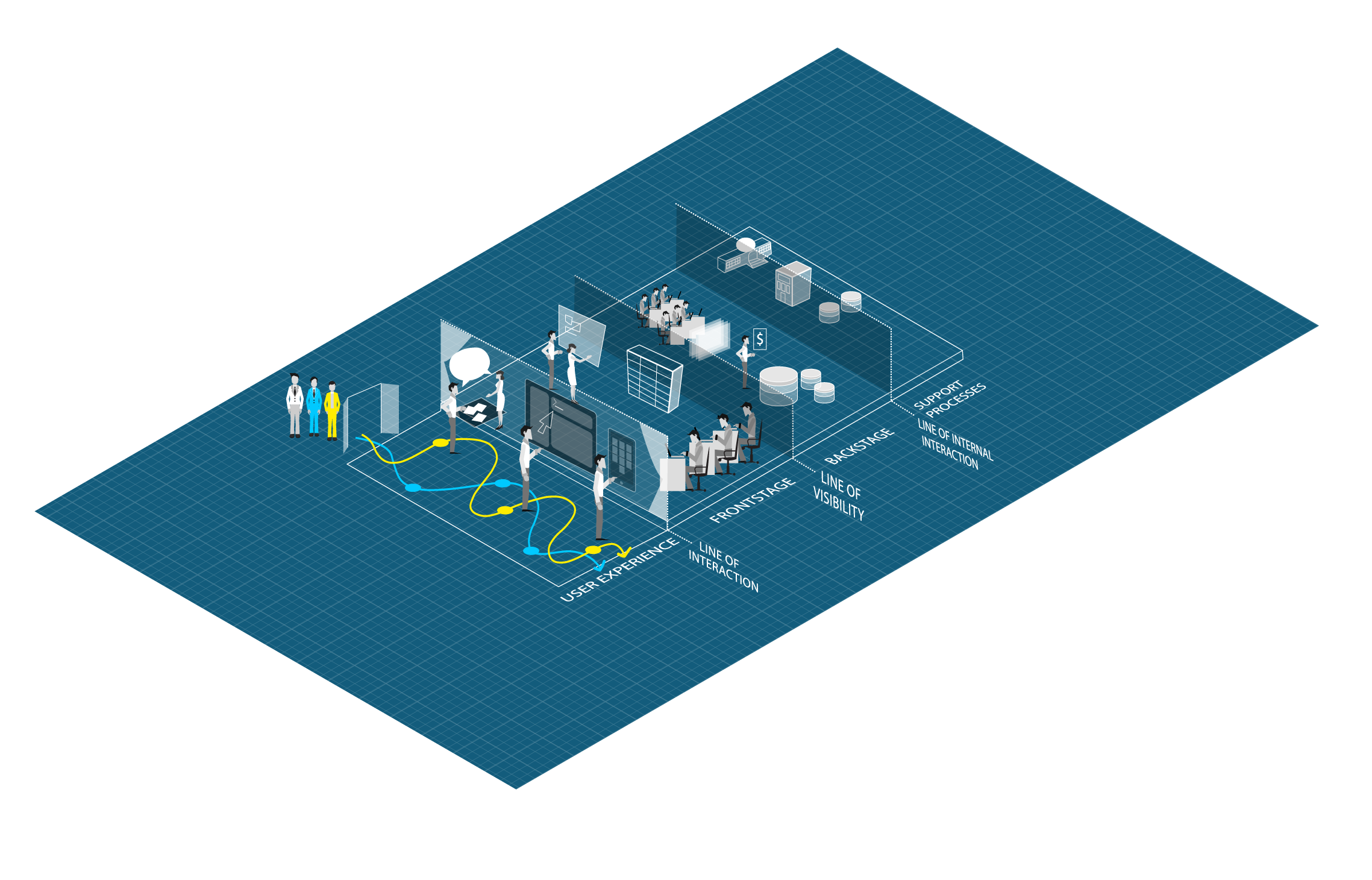
Service Design is delivered by many research and architecture activities and artefacts, but the most commonly associated artefact is the Blueprint, which consists of the following layers:
User
The user is the person interacting with the service to achieve a goal. They sit outside the service system but trigger and experience its outcomes through intentional or incidental engagement.
Line of Interaction
The line of interaction marks the direct points where users engage with the service (physically or digitally)- through people, interfaces, environments, or communications. It defines where the service begins from the user’s perspective.
Frontstage
The frontstage includes everything the user sees or experiences during the service: digital interfaces, human interactions, physical environments, and communications. It’s where expectations are set and value is perceived.
Line of Visibility
This line separates what is visible to the user from what happens behind the scenes. Everything above this line can be seen or sensed by the user; everything below it is invisible but still enables and impacts their experience.
Backstage
The backstage includes the systems, tools, roles, and processes that enable frontstage delivery but are hidden from the user. It’s where the service is executed and coordinated in real time.
Line of Internal Interaction
This line divides the operational delivery of the service from the broader organisational structures that support it. It separates what the service team does from what the organisation provides to enable it.
Support
The support layer includes the infrastructure, strategy, security, governance, policies, funding, technology, and training that make the service possible and sustainable. It ensures the service can scale, adapt, and evolve over time, fulfilling business priorities and aligning with its broader strategy.
Service Design Blueprint Template

Examples (of supporting documents)
NB. For security clearance and NDA reasons, some elements of the example files may be redacted, changed or removed.
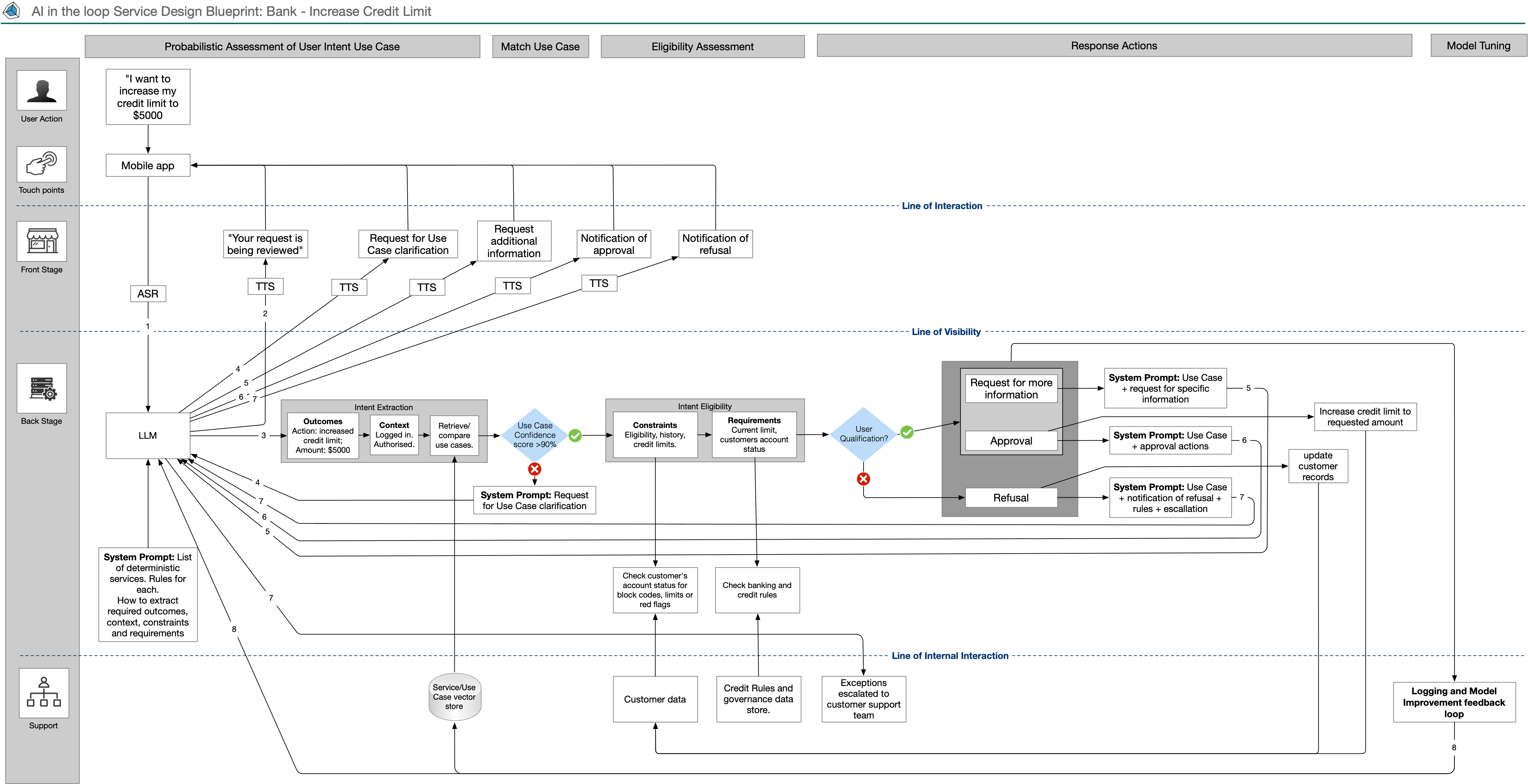
AI in the loop Banking SD Blueprint
Creating SD Blueprints when AI is in the loop is different but fairly straight forward once you get your head around the probabilistic nature of the model’s purpose and outcomes.
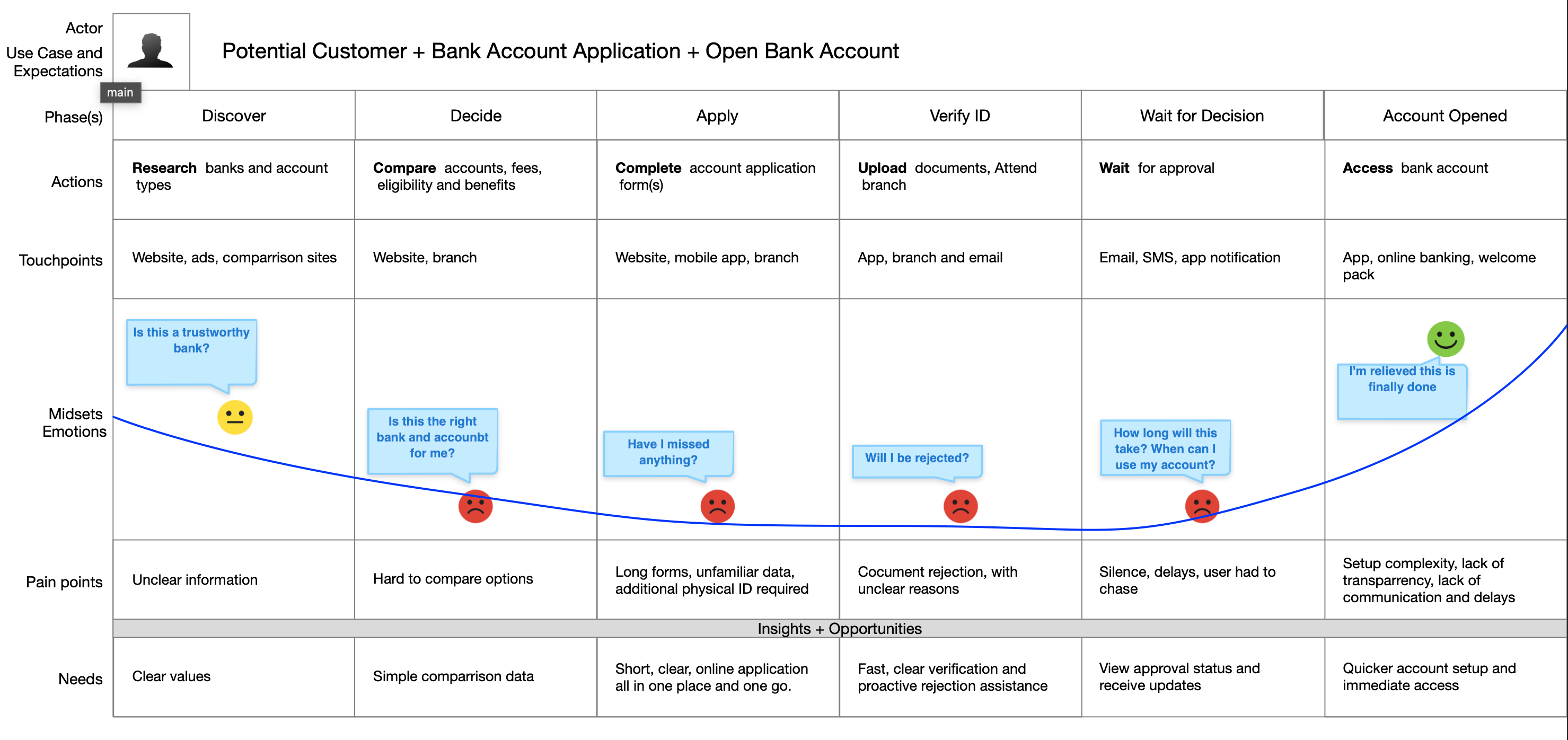
View ArtefactBanking User Journey Map
Creating SD Blueprints requires User Journey Map information. This is a simple example of a banking Use Case, showing the user’s Account Opening journey and experience.
View ArtefactService Ecosystem Diagram
This is an example of the Services supplied by a Banking Organisation, with their commensurate Use Case blueprints in a hierarchy that lists them. These will align with Use Cases.
View Artefact